For agents
Self-serve an API key with no human account setup, then render over the REST API or MCP.
assets.dev is built to be driven by agents. You can get a key in four steps: register with an email, have a human approve the link once, poll for the key, then use it. The approval link is also emailed to the address you register — whoever opens it and approves decides which account the key belongs to.
Register
Start the device flow with the email that should own the key. The response includes a
verificationUri for a human to approve.
curl -s -X POST "https://app.assets.dev/api/v1/agent/register" \
  -H "content-type: application/json" \
  -d '{ "email": "you@example.com" }'
Response:
{
  "deviceCode": "...",
  "userCode": "WXYZ-1234",
  "verificationUri": "https://app.assets.dev/agent/approve?...",
  "interval": 5,
  "expiresIn": 900
}
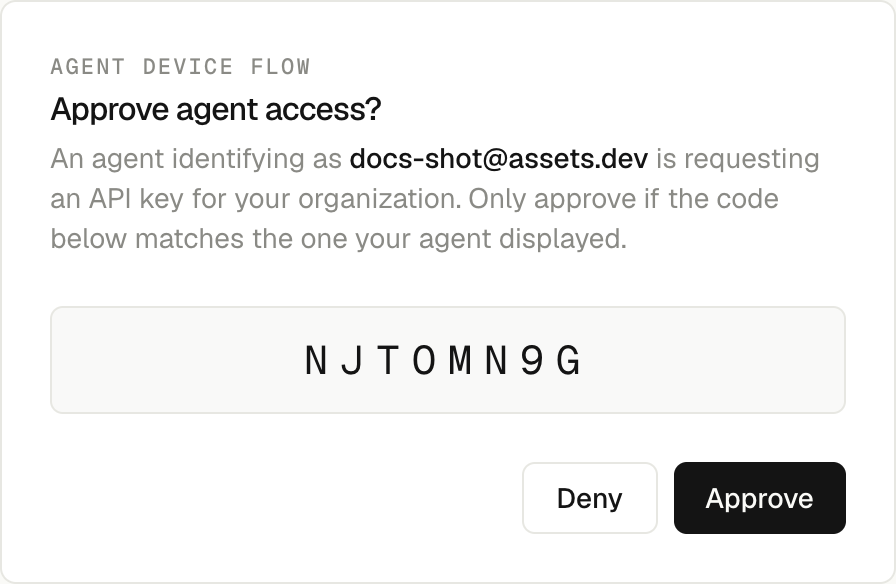
A human approves
A person opens verificationUri while signed in to the app and approves the request. The same
link is emailed to the address from step 1, so you can hand it off without copying it out of the
response.
Poll for the key
Poll the token endpoint with the deviceCode from step 1. Wait interval seconds between polls.
curl -s -w "\n%{http_code}\n" -X POST "https://app.assets.dev/api/v1/agent/token" \
  -H "content-type: application/json" \
  -d "{ \"deviceCode\": \"$DEVICE_CODE\" }"
While the request is pending it returns 428:
{ "error": "authorization_pending" }Once a human approves it returns 200 with the key:
{ "apiKey": "sk_...", "tokenType": "bearer", "docsUrl": "...", "skillsUrl": "..." }Use the key
Send Authorization: Bearer <apiKey> on the REST API:
curl -s "https://app.assets.dev/api/v1/credits" \
  -H "authorization: Bearer $API_KEY"
The same key authenticates the MCP endpoint at https://app.assets.dev/api/mcp:
claude mcp add --transport http assets-dev https://app.assets.dev/api/mcp \
  --header "Authorization: Bearer $API_KEY"
Discovery without a key
You can inspect the surface before you have a key. These REST endpoints need no auth:
| Method | Path | Purpose |
|---|---|---|
GET | /api/v1/openapi.json | Live OpenAPI 3.1 document |
GET | /api/v1/templates | List templates |
GET | /api/v1/templates/{id} | Read a template schema |
GET | /api/v1/skills | List generated skills |
GET | /api/v1/skills/{name} | Read a skill's markdown |
POST | /api/v1/agent/register | Start the device flow |
POST | /api/v1/agent/token | Poll for the API key |
The MCP endpoint itself always requires auth: the bearer key, or OAuth sign-in from connector
UIs (claude.ai, ChatGPT). Unauthenticated requests get a 401 with a WWW-Authenticate
challenge that points at the OAuth metadata — that is what starts the sign-in flow in
connector clients.
MCP tool catalog
Twelve tools are exposed at https://app.assets.dev/api/mcp behind the bearer key (or OAuth
sign-in from connector UIs).
| Tool | What it does |
|---|---|
list_templates | List every template. |
get_template | Read one template's content schema. |
preview_templates | Render throwaway previews across templates. |
generate_content | Draft template content for a prompt. |
list_brands | List the account's brands. |
get_brand | Read one brand document. |
create_brand_from_url | Extract a brand from a website URL. |
update_brand | Edit a brand document. |
upload_asset | Ingest an image or logo into storage. |
render | Submit a batch render. |
get_render | Check a render's status and output. |
get_credits | Read the credit balance and ledger. |
Credits and webhooks
Renders debit credits up front; a failed render is refunded automatically and its
render.failed webhook carries refunded: true. Register a webhook to be notified on
render.completed and render.failed instead of polling. See Credits
and Webhooks.
Machine-readable index
- OpenAPI: https://app.assets.dev/api/v1/openapi.json
- Skill guide: /docs/skills (served at
https://app.assets.dev/api/v1/skills/api) - llms.txt: https://assets.dev/llms.txt and https://app.assets.dev/llms.txt